
TIRADS Calculator
TIRADS Calculator helps radiologists assess thyroid nodules by recording ultrasound characteristics and calculating a TI-RADS score. It also includes an ultrasound worksheet, visual references, scoring recommendations, and a report template.
App information
- Category
- Tools
- Package name
- com.rmcqs.tiradscalculator
- Version
- 1.0.3
- File size
- 6 MB
- Requires
- Android Votes:335
Screenshots
About this app
Overview
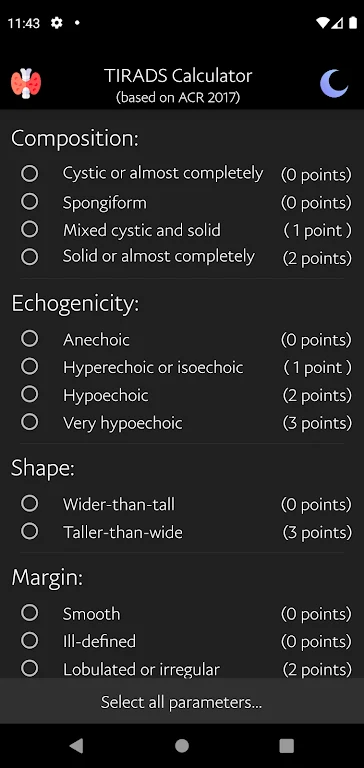
TIRADS Calculator is an Android tool for radiologists who need to classify thyroid nodules from ultrasound findings. It turns selected observations about a nodule’s composition, echogenicity, shape, margins, and echogenic foci into a total TI-RADS score based on established criteria. The app is intended to make scoring easier to review during a clinical workflow, while its worksheet and report template help organize the information used in the assessment. A clean interface, concise explanations, and visual references support both routine use and learning, with the complete scoring process designed to be completed quickly.
What You Can Do
⭐ Record examination findings with the built-in Ultrasound Worksheet. This gives you a place to note the relevant details from an ultrasound examination before entering them into the calculator.
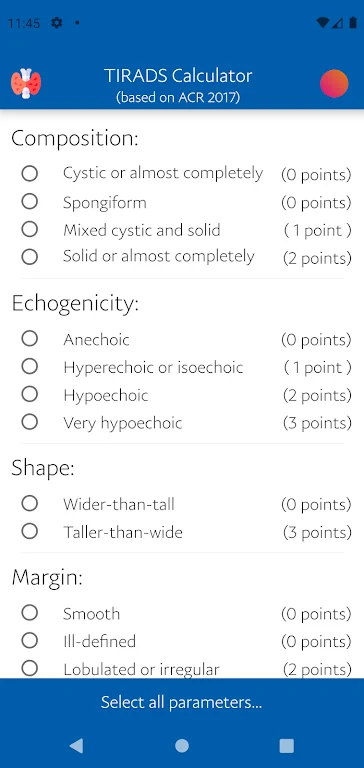
⭐ Select the nodule characteristics used for classification, including composition, echogenicity, shape, margins, and echogenic foci. The calculator processes these selections and returns a TI-RADS score within seconds.
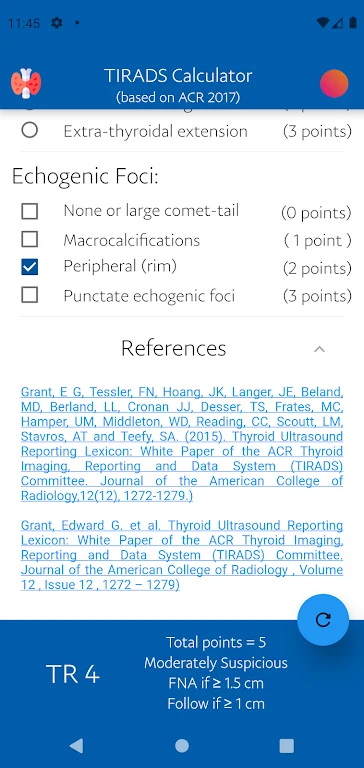
⭐ Review the total score and corresponding recommendations using the scoring chart displayed within the calculator. This helps connect the calculated result with suggested follow-up ultrasound examinations or Fine Needle Aspiration Cytology, according to the resulting classification.
⭐ Compare findings with built-in image references. The visual examples are intended to help users relate textbook appearances to the ultrasound study being assessed.
⭐ Read concise explanations and visual cues for individual parameters. These details can support trainees during rounds, reinforce familiarity with the criteria, or provide a clearer explanation of report terminology.
⭐ Prepare the final diagnostic report with the provided ultrasound report template after completing the assessment.
Using the App
The recommended workflow begins with an ultrasound examination performed according to relevant guidelines. After reviewing the nodule and recording its findings in the worksheet, select the matching classification options in the TI-RADS calculator at the top of the screen. The chart at the bottom then presents the total score and related recommendations. You can use the report template to organize the final diagnostic report, followed by recommendations for further evaluation based on the classification.
The app’s interface is described as minimalist and focused on the assessment process, keeping data entry and score interpretation together. It is also described as fully offline, so the calculator and its supporting material can be used in locations with weak connectivity, such as parts of a hospital or remote clinical settings.
Why It May Appeal
✅ It brings the main TI-RADS selection and scoring steps into one mobile workflow instead of requiring users to repeatedly consult separate reference material.
✅ Visual examples and parameter explanations make the tool useful not only for experienced clinicians but also for residents and trainees reviewing thyroid nodule criteria.
✅ The worksheet, calculator, scoring chart, and report template cover several connected stages of the assessment process.
✅ Offline functionality supports access when a reliable hospital or clinic connection is unavailable.
Things to Consider
❎ The score depends on the accuracy of the ultrasound observations and the options selected. Users should be familiar with the relevant TI-RADS criteria and review the applicable guidance before relying on the result.
❎ The app supports scoring and recommendations, but it does not replace the underlying ultrasound examination, clinical judgment, or the professional guidelines used to interpret the patient’s findings.
Version history
View all27 May 2026 · stable
Frequently asked questions
Who is TIRADS Calculator intended for?
The app is designed specifically for radiologists and may also be useful to endocrinologists, residents, and trainees working with thyroid ultrasound assessments.
What information can I enter?
You can select options describing a nodule’s composition, echogenicity, shape, margins, and echogenic foci, along with other supported assessment details.
Does the app work offline?
The source describes the calculator as having full offline functionality for use in areas with weak or unavailable connectivity.
Does it provide follow-up or FNAC recommendations?
After calculating the TI-RADS classification, the app displays the corresponding recommendations, including guidance related to follow-up ultrasound examinations or Fine Needle Aspiration Cytology.