

Panda Touch Pro
Panda Touch Pro is a game assistant for mapping physical buttons, touch gestures, and macros to actions in supported games. It also provides customizable crosshair settings and an activation workflow for Android devices.
App information
- Category
- Tools
- Package name
- com.panda.touch
- Version
- 9.4
- File size
- 33.8 MB
- Requires
- Android Votes:398
Screenshots
About this app
Overview
Panda Touch Pro is a game assistant that helps players manage touch actions, button mappings, macros, and aiming overlays from one tool. It can map volume buttons, the power button, and other physical controls to actions such as clicks, swipes, multi-touch gestures, and repeated sequences. Players can also create macros for actions that are difficult to perform manually and customize a crosshair for FPS games by choosing its type, color, and size. The app is designed for users who want more control over touchscreen inputs, including people who prefer hardware-button control or screenless interaction during gameplay.
What You Can Do
⭐ Map physical buttons to game actions. Volume buttons, the power button, and other available controls can be reused for clicks, swipes, multi-touch actions, or more involved input sequences.
⭐ Trigger complex actions with one touch. The app can combine multi-touch gestures, swipes, and macros so that a single tap starts an action that would otherwise require several manual inputs.
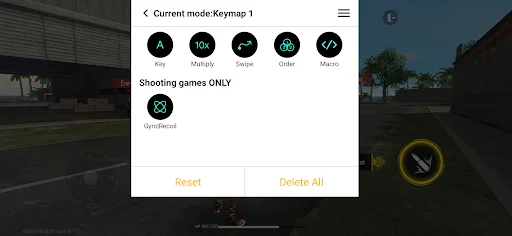
⭐ Build custom macros. The macro editor supports clicks, multiple clicks, delays, swipes, presses, and multi-press sequences. These actions can be arranged into a defined order for repeated combinations.
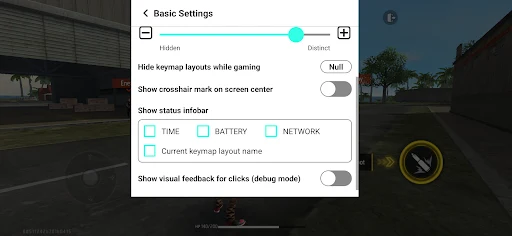
⭐ Customize an FPS crosshair. Choose from different crosshair types, colors, and sizes to create a fixed visual reference for games that benefit from a visible center point.
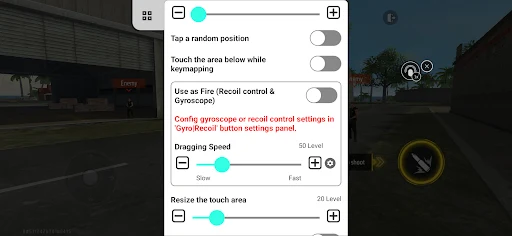
⭐ Create touch mappings with overlays. Virtual buttons can be placed over the game screen and aligned with in-game controls, allowing mapped actions to correspond to specific positions.
⭐ Use controls without relying only on on-screen buttons. By reusing existing device buttons and assigning them new functions, the app supports a more hardware-focused control style.
Using the App
Activation comes before mapping. On Android 11 or later, the source describes the activation process as requiring no further activation method. On Android 10 or earlier, users can connect the device to a PC or Mac with a USB debugging tool, or use Shizuku. Rooted devices are described as activating automatically. The app also provides step-by-step prompts to help with activation and requests permissions needed for overlays and touch mapping.
After activation, create a mapping profile and enable overlays before opening the target game. Place virtual buttons where the corresponding in-game icons appear, then assign each button to a hardware button, click, or swipe. Testing each mapping briefly can help confirm that the touch point is positioned correctly.
For repeated actions, open the macro editor, add clicks, delays, and swipes in the desired order, and give each macro a clear name. The supplied guidance recommends testing timing in a training or safe area and adjusting delays when necessary. A crosshair can be configured separately by selecting its type, size, and color, then enabling it when needed for a particular game or mode.
Why It May Appeal
✅ It brings button remapping, touch gestures, macros, overlays, and crosshair controls into a single game-assistant workflow.
✅ The macro editor offers several action types and timing controls instead of limiting users to one repeated tap.
✅ Physical-button mappings can reduce dependence on visible on-screen controls for players who prefer a less cluttered interaction style.
✅ The activation instructions cover Android 11 and later, older Android versions, Shizuku, USB debugging, and rooted devices.
Things to Consider
❎ Initial setup may require permissions for overlays and touch mapping. Devices running Android 10 or earlier may also require Shizuku or a connection to a PC or Mac through USB debugging.
❎ Mappings and macros need to be tested and adjusted for placement and timing, particularly when changing games or control layouts.
Version history
View all15 Jun 2026 · stable
Frequently asked questions
What is Panda Touch Pro used for?
It is a game assistant for mapping physical buttons and touch actions, creating macros, placing overlays, and customizing crosshairs for FPS games.
How does activation work on Android 11 or later?
The supplied information states that Android 11 and later devices do not require an additional activation method, although the app still guides users through its setup and requested permissions.
What is needed on Android 10 or earlier?
The app can be activated with Shizuku or a USB debugging tool. The instructions also describe connecting the device to a PC or Mac when prompted.
Can Panda Touch Pro create macros?
Yes. Its macro editor supports clicks, multi-clicks, delays, swipes, presses, and multi-press sequences arranged in a chosen order.
Can the crosshair be customized?
Yes. Users can select a crosshair type, color, and size, then enable it when a fixed center reference is useful.