

File Box - File Manager
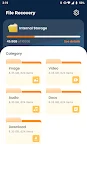
File Box - File Manager helps you find, organize, view, and share files from an Android device. It supports keyword search, recently used files, storage statistics, simultaneous file management, compression, and recognition of multiple file formats.
App information
- Category
- Tools
- Package name
- com.space.box.manager.tool
- Version
- 1.0.9
- File size
- 17.8 MB
- Requires
- Android Language:
Screenshots



About this app
File Box - File Manager is designed for managing files on an Android device when you need to locate, organize, or share them without a complicated interface. Its tools cover searching, sorting, storage review, compression, and support for multiple file formats.
Finding files when you need them
When a file is difficult to locate, the fast search function lets you enter keywords to find it more quickly. The app also provides access to recently used files, which can be useful when returning to documents or other items you have opened before. Multiple file formats are recognized, so the manager can work with a wide range of file types.
Organizing several files together
For tasks that involve more than one item, File Box - File Manager supports managing multiple files simultaneously. You can use this approach to organize and sort files rather than handling each item separately. The simple interface is intended to keep these actions accessible with a small number of taps.
Reviewing storage and reducing folder size
Storage statistics provide a way to check information about the space used on the device. When files or folders take up more internal storage than desired, the compression function can compress them to help save space. This gives storage review and file compression separate roles: one shows storage information, while the other works on selected files or folders.
Sharing files with others
After locating or organizing an item, the app can be used to share files with other people. This places searching, file handling, and sharing within the same file management workflow instead of requiring a separate file-browsing tool for the initial steps.
Version history
View all03 Jun 2024 · stable