

Double Tap Screen On and Off
Double Tap Screen On and Off is a no-root utility for controlling the Android display with gestures instead of the physical power button. It supports double-tap and shake actions, a gesture lock, touch input control, adjustable sensitivity, and a floating button for shortcuts and settings.
App information
- Category
- Tools
- Package name
- com.appzstudioz.doubletap.shake.volume
- Version
- 1.9
- File size
- 5.7 MB
- Requires
- Android Votes:214
Screenshots
About this app
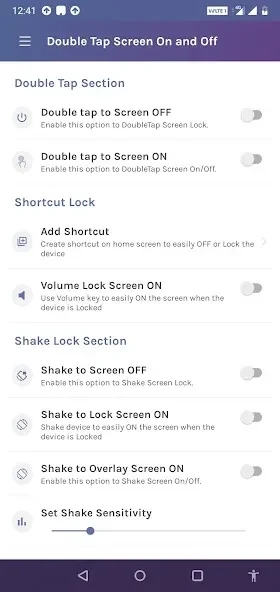
Double Tap Screen On and Off is a utility for waking or putting the phone display to sleep through gestures rather than relying on the physical power button. Its controls include double-tapping the display, shaking the device, applying a gesture lock, and using a movable floating button for quick access to selected functions.
How can the screen be turned on or off?
The main control uses a double tap on the display, with the source describing use on the home screen and near the top edge or status bar. This gives users an alternative to pressing the power key when they want to wake or sleep the screen. The application is described as working without root access.
Can the phone respond to movement as well as tapping?
Yes. A shake action can be assigned to waking or sleeping the device. The source presents this as an alternative for situations in which the power button is difficult to reach or the user wants to operate the phone with a different gesture. Double-tap-only, shake-only, and mixed behavior modes are available for choosing how the controls work.
What controls are available for locking the device?
The app includes a gesture lock screen that lets the user set a custom gesture as a lock method. It also provides a touch screen lock that temporarily disables touch input, which is intended to help prevent accidental taps while the phone is in a pocket or bag. These are separate controls from the display wake and sleep actions.
What does the floating button do?
A movable floating pop-up button can provide access to favorite apps, shortcuts, and settings from the current screen. It can also be used to enable or disable the app's features without opening deeper settings menus. This gives the user a visible control point for changing the utility's active behavior.
Can gesture detection be adjusted?
Settings include sensitivity controls for both double-tap detection and shake detection. These options are intended to let users adapt the response to their device and personal habits. The source also describes customization such as changing the app icon and adjusting brightness with a gesture, although the available choices may depend on the device and configured mode.
What permissions and Android requirements are described?
The application uses Android Accessibility services for consistent screen-control behavior across Android versions and apps that might otherwise restrict these actions. The source also describes Device Administrator permission for older Android versions, while Accessibility permission is required for Android Pie and later. Draw Overlay and Usage stats permissions are additionally mentioned for gesture detection on the home screen. Users should review these requests and grant only the access they are comfortable providing.
Is the application intended to run continuously?
Double Tap Screen On and Off is described as a lightweight utility that can operate in the background while its gesture features are enabled. The source says its design aims for low battery impact, while also noting that background features and higher sensitivity can affect battery use. The app therefore offers quick enable and disable controls when its gesture functions are not needed.
Version history
View all02 Feb 2026 · stable
Frequently asked questions
Will a thick screen protector affect double-tap detection?
Most modern screen protectors are described as compatible, but very thick protectors or some tempered glass may reduce sensitivity. The app provides sensitivity adjustment to help adapt detection.
Which app version is listed in the source?
The supplied application information lists version 1.9.
What type of application is Double Tap Screen On and Off?
It is listed in the Tools category as an Android utility application.