

Assistive Touch for Android
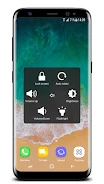
Assistive Touch for Android adds virtual Home, Volume, and Back controls, along with shortcuts to favorite apps and settings. It also supports customizable floating-button gestures, screenshot capture, and a power popup on Android 5.0 and later.
App information
- Category
- Tools
- Package name
- com.dev.assistivetouch
- Version
- 4.2
- File size
- 7.9 MB
- Requires
- Android Language:
Screenshots


About this app
Assistive Touch for Android provides a floating set of virtual controls for common phone actions. It includes Home, Volume, and Back buttons, shortcuts to favorite apps and settings, customizable gestures, screenshot capture, and a power popup.
Navigation and volume controls
The virtual Home button can lock the screen and open recent tasks. A virtual Back button provides an alternative way to navigate, while the virtual Volume button lets you adjust volume and change the sound mode.
Shortcuts and floating-button gestures
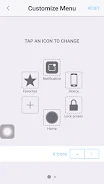
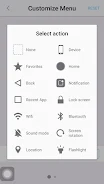
The app provides quick access to selected favorite applications and device settings. The floating button can be configured to respond to taps, double taps, and long presses with different functions.
Additional actions and compatibility
Assistive Touch for Android includes screenshot capture and a power popup for additional device actions. The app is described as compatible with Android 5.0 and later.
Version history
View all21 Jun 2024 · stable
Frequently asked questions
What Android version is required?
The app is described as compatible with Android 5.0 and later.